You can choose which model Copilot uses for each GitHub Desktop feature, such as commit message generation and conflict resolution.
You can also configure GitHub Desktop 中的Copilot to use your own LLM provider (BYOK) instead of GitHub-hosted models. This lets you connect to OpenAI-compatible endpoints, Azure OpenAI, or Anthropic, including locally running models such as Ollama.
Prerequisites
- You must be signed in to a GitHub account with access to GitHub Desktop 中的Copilot.
- If your access is managed by an organization or enterprise, GitHub Desktop 中的Copilot must be enabled for your account.
- You have an API key or bearer token from a supported LLM provider, or you have a local model running, such as Ollama.
- You have the base URL and at least one model identifier for the provider you want to use.
注意
Custom LLM providers in GitHub Desktop require access to GitHub Desktop 中的Copilot. To use your own LLM models with Copilot 命令行界面(CLI), see 在 GitHub Copilot CLI 中使用自己的 LLM 模型.
Supported provider types
GitHub Desktop supports three custom provider types:
| Provider type | Compatible services |
|---|---|
| OpenAI / OpenAI-compatible | OpenAI, Ollama, vLLM, Foundry Local, and any other endpoint that is compatible with the selected API format. |
| Azure | Azure OpenAI Service. |
| Anthropic | Anthropic Claude models. |
Configuring your provider
You configure your model provider by adding a custom provider in GitHub Desktop settings.
-
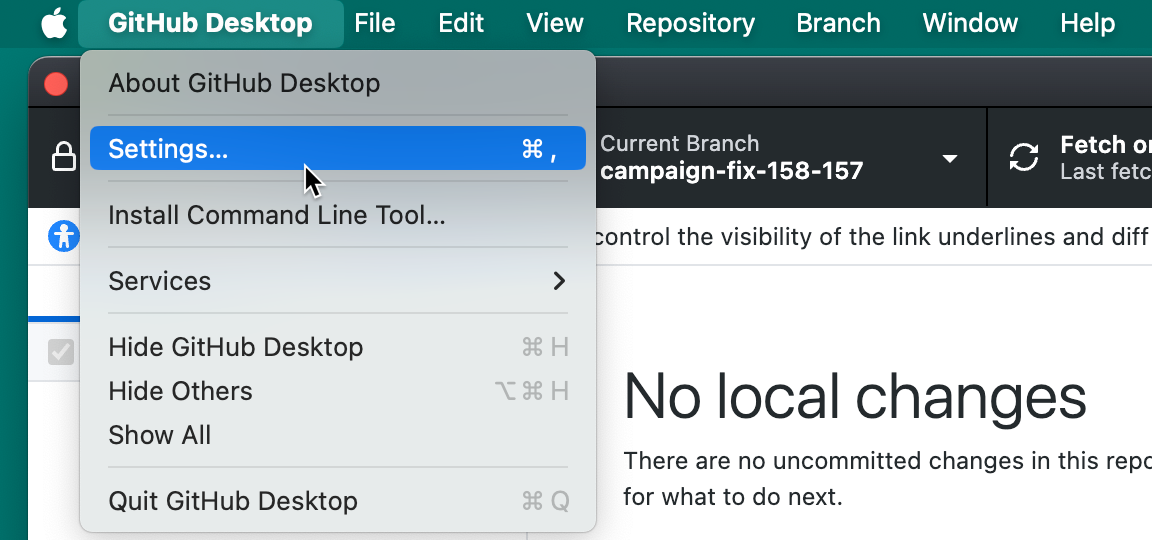
在菜单栏中,选择“GitHub Desktop”,然后单击“设置”********。
-
In the left sidebar, click Copilot.
-
单击“ 提供程序 ”选项卡。
-
单击“ 添加提供程序”。
-
在 “名称” 下,键入 LLM 提供程序的名称。
-
在 “类型” 下,选择提供程序类型。
-
在Base URL下方,输入你的模型提供商 API 端点的基础 URL。
基 URL 必须是 HTTPS URL,或者是指向本地计算机的 HTTP URL。
-
如果选择 了 OpenAI/OpenAI 兼容,请在 API 格式下选择提供程序所需的 API 格式。
- 对于使用 OpenAI 聊天完成 API 的提供程序,请选择 “聊天完成”(默认值 )。
- 对于使用 OpenAI Responses API 的提供方,请选择响应(GPT-5 系列)。
-
如果选择Azure,请在Azure API 版本下键入部署的 API 版本。
-
(可选)在 请求超时(秒) 下,键入等待提供程序响应的秒 GitHub Desktop 数。
-
在 “身份验证”下,选择身份验证方法。
- 选择 API 密钥 以使用 API 密钥进行身份验证。
- 选择 持有者令牌 以使用持有者令牌进行身份验证。
- 仅针对不需要凭据的终结点选择 “无 ”。
-
如果您选择了 API 密钥 或 Bearer 令牌,请输入所需的凭据。
-
向提供程序添加至少一个模型。 有关详细信息,请参阅 向提供程序添加模型。
-
单击 添加。

-
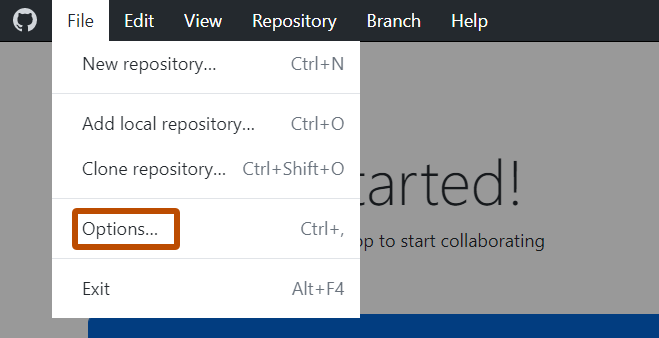
使用文件”菜单,然后单击“选项” 。
-
In the left sidebar, click Copilot.
-
单击“ 提供程序 ”选项卡。
-
单击“ 添加提供程序”。
-
在 “名称” 下,键入 LLM 提供程序的名称。
-
在 “类型” 下,选择提供程序类型。
-
在Base URL下方,输入你的模型提供商 API 端点的基础 URL。
基 URL 必须是 HTTPS URL,或者是指向本地计算机的 HTTP URL。
-
如果选择 了 OpenAI/OpenAI 兼容,请在 API 格式下选择提供程序所需的 API 格式。
- 对于使用 OpenAI 聊天完成 API 的提供程序,请选择 “聊天完成”(默认值 )。
- 对于使用 OpenAI Responses API 的提供方,请选择响应(GPT-5 系列)。
-
如果选择Azure,请在Azure API 版本下键入部署的 API 版本。
-
(可选)在 请求超时(秒) 下,键入等待提供程序响应的秒 GitHub Desktop 数。
-
在 “身份验证”下,选择身份验证方法。
- 选择 API 密钥 以使用 API 密钥进行身份验证。
- 选择 持有者令牌 以使用持有者令牌进行身份验证。
- 仅针对不需要凭据的终结点选择 “无 ”。
-
如果您选择了 API 密钥 或 Bearer 令牌,请输入所需的凭据。
-
向提供程序添加至少一个模型。 有关详细信息,请参阅 向提供程序添加模型。
-
单击 添加。

Adding models to your provider
Add the models you want to use from your provider. Each model you add appears in the model picker alongside GitHub-hosted models.
-
In the Add Custom Provider or Edit Custom Provider dialog, under Models, click Add Model.
-
Under Display Name, type the friendly name shown in the Copilot model picker.
-
Under Model Identifier, type the exact model name your provider expects.
-
Under Reasoning Effort, select the reasoning level for the model.
For non-reasoning models, or to let the provider choose, leave Default (provider's choice) selected.
-
Click Add.
Reviewing provider responsibilities
When you use your own LLM provider, GitHub Desktop sends prompts and repository context to that provider instead of GitHub. Check your provider's data handling and retention policies before adding credentials.
Always review generated commit messages and conflict-resolution suggestions before committing. For more information, see 负责任地使用GitHub Copilot功能.